

Spaceships campervan features & specifications
Info about the features & specifications of Spaceships campervans in Australia and how to use them
Frequently asked questions
-
Why doesn’t the front door stay open?
The front doors of your Spaceships campervan are not fitted with a stay or locking mechanism, so they will not remain open on their own—especially on uneven surfaces such as campsites.
This is normal and not a fault with the vehicle.
-
Why won’t my campervan’s central locking work after a flat battery?
The most common cause of a flat battery in a Spaceships campervan is leaving the headlights on.
Even after a successful jump start, the battery may not have enough charge to power systems like the central locking - especially the rear door - because these systems require a stable voltage. The alternator needs time to recharge the battery fully, and until then, some electrical components may remain non-functional.
What to do:
Leave the engine running for at least 60 minutes to allow the battery to recharge
Drive for a longer period — a minimum of 4 hours driving is required to fully recharge a flat battery.
Avoid using non-essential electrical systems (such as the radio, A/C, and fridge) while the battery is recharging
The alternator will recharge the battery while the engine is running, but it takes time. If the engine is turned off too soon, another jump start may be required.
-
What side is the fuel cap on my Spaceships campervan?
In Spaceships Australia campervans (Toyota Estima model), the fuel cap is located on the left-hand side (passenger side) of the vehicle.
-
How to De-fog the Windscreen
To quickly de-fog a cold windscreen, use your vehicle’s climate controls to remove moisture from the air inside the cabin and replace it with drier air from outside.
Follow these steps for the fastest results:
Turn on the windscreen defroster
Set the airflow to the windscreen defrost setting.Turn on the air conditioning (A/C)
Even in cold weather, the A/C helps remove moisture from the air and clears the windscreen more effectively.Set the heater to the hottest setting
Warm air can hold more moisture than cold air, which helps clear condensation faster.Turn off air recirculation
Make sure the vehicle is drawing in fresh air from outside rather than recirculating the humid air inside.
Extra tips for clear windows
Crack a window slightly if it’s not raining. This helps let humid air out and brings in drier air from outside.
Avoid wiping the inside of the windscreen with your hand or a cloth, as this can leave streaks and reduce visibility.
-
Bluetooth pairing guide for your Spaceships' stereo
We have two types of Bluetooth stereos installed in our Spaceships campervans in Australia. Below are step-by-step instructions for pairing your phone with each system.
1. AXIS Bluetooth Stereo (AX1502BT)
Get ready to connect your phone in just a few easy steps.
How to pair your phone
Turn on the AXIS stereo and press the Mode (SRC) button until you reach Bluetooth Music.
Turn on Bluetooth on your phone.
Search for new devices in your phone’s Bluetooth settings.
Select "AX1502BT" from the list.
If prompted, enter the password: 1234.
Once paired, the BT and HPF icons will light up on the stereo. The A2DP icon will appear when the connection is complete.
Troubleshooting
If the stereo doesn’t appear in your phone’s Bluetooth list, ensure Bluetooth is enabled on both devices.
If the connection fails, turn Bluetooth off and on again on your phone, then retry pairing.
PDF manual of the AXIS Bluetooth stereo (AX1502BT)
If you prefer to have the PDF manual on your phone so you can check it on the road, you can download it here 👇
2. Sony MEX-N5300BT Bluetooth Stereo
Pairing your phone is quick and simple. Let’s get started.
How to pair your phone
Press the Menu button on the stereo.
Rotate the control dial to select BLUETOOTH, then press it.
Rotate the dial to select SET PAIRING, then press it.
Select SET DEVICE 1 or SET DEVICE 2, then press the dial.
The Bluetooth symbol (ℹ️) will flash, indicating the stereo is in pairing mode.
On your phone, search for Bluetooth devices and select "MEX-N5300BT".
If prompted, enter the passkey: 0000.
NFC pairing (Android phones only)
Activate NFC on your Android phone.
Touch the N-Mark (NFC symbol) on the stereo with your phone.
The stereo will automatically pair with your phone.
Troubleshooting
If pairing fails, turn Bluetooth off and on again on your phone, then retry.
Ensure the stereo is in pairing mode (ℹ️ flashing).
If the stereo doesn’t appear, restart Bluetooth on your phone.
PDF manual of the Sony MEX-N5300BT stereo
If you prefer to have the PDF manual on your phone for reference, you can download it here 👇
General tips for both stereo systems
Forget the device on your phone and retry pairing if connection issues persist.
Restart your phone if the stereo isn’t detected.
Check your phone’s Bluetooth settings to ensure it’s discoverable.
-
How to use the gas stove that is included with your Spaceship campervan?
All Spaceships Australia campervans are equipped with portable gas stoves (two included per vehicle). These high-quality, tabletop gas cookers are designed for convenience and ease of use during your travels.
The stoves operate using butane gas canisters (2 are included), which are compact and widely available at outdoor retailers, camping stores, and department stores across Australia.
Inserting a Gas Canister
Ensure the stove is turned off before inserting a new canister.
Remove the cap from the gas canister.
Insert the canister into the stove, making sure the nozzle at the top is properly aligned. The gap in the canister’s rim should face upward to allow the locking mechanism to secure it.
Push the locking lever down to lock the canister in place. If the lever is difficult to move, double-check the alignment of the canister.
For visual guidance, see the images and video below.
Igniting the Gas Cooker
The gas cooker features a built-in ignition system for quick and safe operation:
Push and turn the ignition knob anti-clockwise past the ‘lightning flash’ symbol until you hear a click.
If the burner doesn’t light, turn the knob to the ‘OFF’ position immediately and try again.
Adjust the flame by turning the ignition knob between the ‘HIGH’ and ‘LOW’ settings.
Turning Off the Gas Stove
To safely turn off the stove:
Turn the ignition knob to ‘OFF’ to stop the gas flow.
Wait for the flame to extinguish completely before lifting the cartridge lever to ‘UNLOAD’ and removing the gas canister.
Always remove the gas canister when the stove is not in use or when storing it.
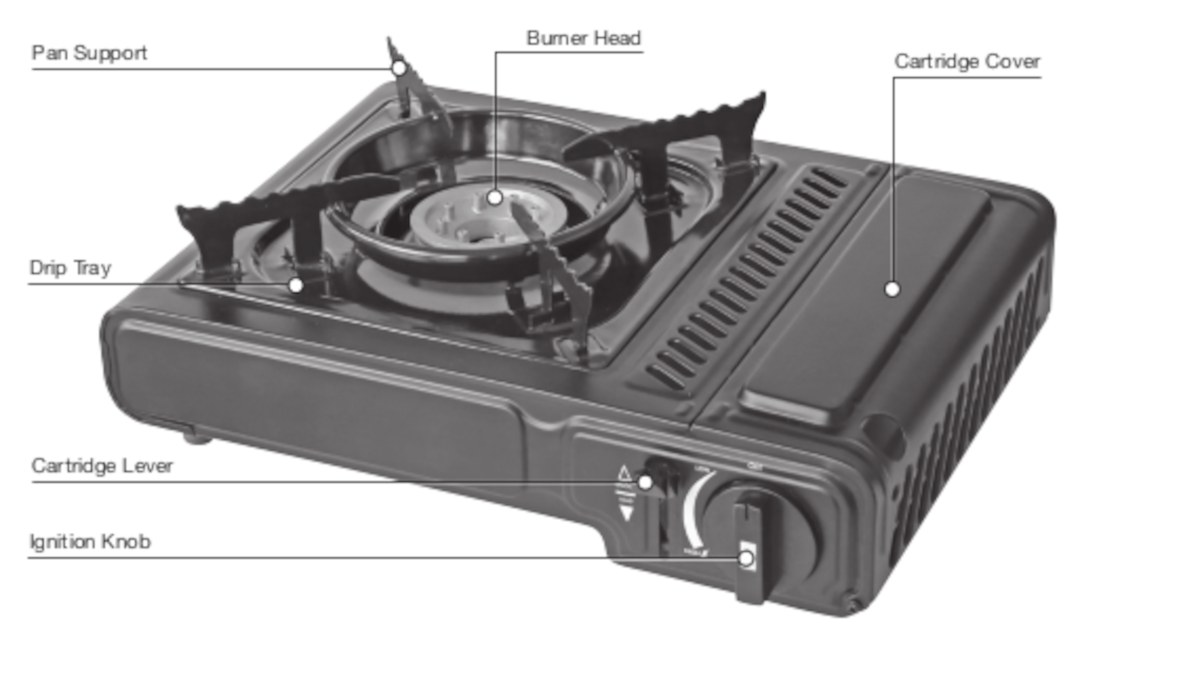
See how the Gasmate camping stove works and what each part/item of the stove does -
Is roadside assistance included? What to do in case of issues on the road?
Spaceships are regularly maintained and if something does happen, each vehicle comes with 24-hour roadside assistance. We'll take care of you when you're on the road. No worries. This service is provided by RACQ - Royal Automobile Club of Queensland. RACQ roadside assistance covers you in all states and territories, so help will never be too far away.
How to contact RACQ Roadside Assistance
Call the RACQ Roadside Assistance via Spaceships: 1300 132 469 and select option #3. One phone number for all things related to your Spaceships rental, from customer service to roadsisde assistance.
Also, all Spaceships campervans in Australia come with jumper leads / cables in case you've left the lights on and it drained the battery.
Please note: When the issue on the road is the driver's fault aka operator's fault you are liable for a call out fee when using roadside assistance. Operator's fault includes but are not limited to losing the keys or leaving the headlights on. See our Terms & Conditions for more info.
-
How to turn the internal LED light / oval light (interior light) on or off
Turning the interior LED light / oval light / touch-light in the cabin on or off is an easy yet subtle process. There isn’t an oldskool switch, but there is a touch-switch on the light itself. The small dent/notch on the light is the switch. Touch it gently and the light will go on or off.
If it’s being stubborn, try giving it a bit of static electricity magic by rubbing your finger with some fabric - sometimes a little spark can do wonders! Also, since the light is touch-sensitive, it may not work if your hands are too cold.

Tap gently to turn the interior LED light on or off See this how-to video for more info about using the interior LED light - all Spaceships Australia campervans have the same interior LED light system. It starts at the end of the set-up of the bed segment and right before the awning demonstration, see the timeline of the video for chapters and their name.
-
Are Spaceships campervans equipped with cruise control?
Spaceships campervans come with heaps of features and lots of things included, but cruise control isn't one of them.
-
Are jumper leads included? How to jump start the campervan?
Jumper leads / jumper cables are included with every Spaceships campervan in Australia. These can be found next to the jack & tools in your Spaceship.
A flat battery is always frustrating. To jump start your vehicle with the provided jumper leads you will need another vehicle so you can connect the leads to their battery in order to jump start your vehicle.
It is really important you follow the below steps. If you put the red cable on the car batteries wrong terminals you can cause sparks and blow the vehicles main fuse which will cause further issues and will require towing of the vehicle.
If you are not absolutely comfortable using the jumper leads please don’t do it and call Roadside Assistance. They will be able to come out and provide you with a jump start. If the battery has been run flat and deemed not a mechanical fault the call out could involve a call-out fee.
Follow these steps to jump start the vehicle
Manoeuvre both cars so that they're nose to nose. This enables the cables to reach both batteries.
Connect the red positive (+) cable to the battery terminal with the + sign on the good car. You will need to carefully locate the + sign on each vehicles battery. Take extra care to make sure you get this correct.
Connect the red positive cable to the battery terminal with the + sign on the car with the flat battery.
Next, connect the black negative cable to the battery terminal with the - sign on the good car.
Now connect the black negative cable to the battery terminal with the - sign on the car with the flat battery.
Start the car with the good battery and let it idle for 30 seconds. This will help to avoid the good battery getting drained when starting the other car.
Now, start the car with the flat battery and wait until it idles smoothly before carefully disconnecting the jumper leads from both vehicles.
Jump start instructions [video]
-
Is there a fridge in Spaceships campervans?
Yes, all Spaceships in the Australian fleet come with a fridge/freezer.
Compare all campervans and see the specifications & features of each campervan category.
-
Do your campervans have curtains? Can people look inside?
All Spaceships Campervans come with light-blocking curtains around the sleeping area. So no need to worry about campervan privacy. The outside world cannot look into the campervan when the curtains are closed. And luggage will be stored in the storage area under the bed so no one can see that either.
See for example, the photo below of the famous Beta Campervan. You can see the curtains all around. However, we've left them open when the photo was taken otherwise it would have been too dark.

Setting up the bed of the Beta campervan - curtains all around the sleeping area -
What are the vehicle dimensions of a Spaceships campervan?
Wondering what the size of each Spaceships campervan is? How big is a Spaceships campervan? All Spaceships campervans are based on the Toyota Estima, MPV model. They're easy to drive for any driver, no matter your age or skill level. The vehicle dimensions are as follows....
Alpha, Beta & Beta 2S: 4.6m (L) x 1.6m (W) x 1.8m (H)
Beta 4-berth with rooftop tent: 4.6m (L) x 1.6m (W) x 2.3m (H)
Note: L = Length; W = Width; H = Height
Our vehicle comparison page shows you the vehicle dimensions and all the other specifications as well. It's a great way to compare our campervans and see which one fits your travel plans best.
-
Flat tyre: what to do? What is the tyre size and preferred brand?
A flat tyre can always happen. In your home country with your own car, but also here in Australia while on your Spaceships road trip. Your Spaceship is equipped with a spare tyre. To change a tyre is just as easy as on any regular car. Check out this video that shows you how to change the tyre of your Spaceship.
Please ensure you contact Spaceships in the event of a flat tyre to get approval for the repair.
Tyre Size: 215/60R16
Preferred Brand: Serenity Plus
Preferred Tyre Repairer: Bridgestone Australia (with branches across Australia)
-
How to release the handbrake?
Our vehicles come with a foot brake instead of a handbrake. To release the foot brake on our vehicles, follow these steps:
Locate the Foot Brake: Our vehicles are equipped with a foot-operated handbrake instead of a traditional handbrake. The foot brake is on the far left side of the pedal assembly.
Engage the Foot brake: To engage the foot brake, press down on the foot brake pedal with your left foot.
You’ll see a red exclamation mark inside a circle on your dashboard indicating that the foot brake is engaged.
Release the Foot brake: To release the foot brake, press down on the pedal with your left foot and then lift your foot so the pedal can return to its original up position. The foot brake will disengage, and the red exclamation mark inside the circle on your dashboard will disappear.
Accelerate and Brake: Use the pedal on the right side to accelerate, and the one to the left of it for braking.
-
What is the correct tyre pressure?
The tyre pressure for all wheels on Spaceships campervans must be between 35-40 PSI. This is checked before your campervan leaves the depot, and it's important to maintain the same PSI on all four tires.
For long road trips, including travel through the outback, we recommend checking the tire pressure monthly or more frequently if you’re driving long distances each day. Always check and adjust the tire pressure when the tires are cold—meaning the campervan has been parked for at least three hours or driven less than 2 km at a moderate speed. The best times to check are at the start of a new road trip day or if the campervan has been stationary for an extended period.
If the reading is above the recommended range, release some air; if it’s below, add air to reach the correct pressure.
-
Should we check the oil level? How often and how to do it?
Please check oil and coolant every 5 days. Do this when engine is cool.
Open bonnet and locate oil dip stick. Pull it out and wipe dry
Reinsert dip stick and pull back out again and check oil level. The oil should between half full and full on dip stick, there is a high and low level on dip stick. If oil is required to be topped up, please check the back of the campervan in the spare tools compartment there should be a spare bottle of oil to top up.
Please take oil cap of motor and fill up slowly not spilling any oil. Please remember to put oil cap back on motor.
What type of engine oil do you use? 10W-30
If you need help please call the friendly Spaceships Crew or ask the attendant at a petrol station.
-
What kind of fuel goes into a Spaceship? What kind of petrol?
All Spaceships have petrol engines, so they love to drink 91-octane petrol (unleaded petrol 91).
The capacity of the fuel tank is 60 litres and that will last you for approx. 600-650km.
In our vehicles in Australia, you can use:
Unleaded Petrol 91 (recommended)
Unleaded Petrol 95
Unleaded Petrol 98
DO NOT USE:
Diesel
E10 fuel - Caution: Our vehicles are not designed to use E10, you must not use it, as it can cause damage to the engine and fuel system.
Please note, using the incorrect fuel is not covered by your insurance with Spaceships.
The driver is liable for all associated costs, including but not limited to roadside assistance call-out fees, towing, accommodation, and repairs.
-
Does Spaceship come with cooking & sleeping gear? Is bed linen (bedding) included?
Yes, all Spaceships campervans come with sleeping & cooking gear. Everything you need for an awesome road trip in Australia is included for FREE:
comfy mattress + cover
duvet + cover
2x pillows + covers
If you hire the Beta 4berth with the rooftop tent, you will receive double the amount—one set for each bed.
The duvet and pillows are filled with synthetic fibres. The sheets are made of cotton.
The cooking gear includes:
2x single burner stoves
Cutlery
Cups
Plates
Bowls
Pan
Pot
Chopping board
Large knife
Peeler
Can opener
Kettle
Everything you need to create a tasty meal on the road is included. You just need to shop for ingredients and add a touch of cooking magic yourself.
-
How's the aircon/heating when the engine is turned off?
When the engine of your Spaceships is turned off, features like the aircon & heating are turned off as well. Just like in your car at home.
The smart battery system of your Spaceships campervan powers internal camping items like the fridge, USB ports near the bed and the oval light in your cabin even when the engine is off.
To allow fresh air in during warm Australian nights, you have two options:
Mosquito Nets: We offer mosquito nets for the rear windows for $50 per rental. These nets allow you to leave the windows open during the night while keeping bugs out. Even leaving the windows slightly open will provide good airflow.
Rear Awning: All our vehicles in Australia come with a rear awning. This tent-like structure extends from the back of the campervan, providing extra space and a nice airflow while you sleep. Please note that the rear awning is not waterproof and should only be used in dry weather or very light drizzle, as the fabric can conduct water.
-
Is the driving and sleeping comfortable for tall people (over 2m tall) as well?
The driver’s seat and steering wheel are adjustable, just like in a normal car, so you’ll be comfortable while driving through Australia.
The bed’s dimensions are 1.4m wide by 1.9m long. We offer an additional bed extension set to extend the bed to 2.3m in total, available upon request. To add this to your booking, please contact our friendly team.
With the bed extension, you can extend your bed both inwards and outwards using the rear awning to make it longer.
Using the Rear Awning to Extend the Bed Outwards:
All Spaceships campervans offer two sleeping options:
Fully Inside: Extend your bed within the cabin with the boot closed.
Partially Extended Outwards: Extend your bed outwards and use the rear awning to cover the open boot.
When you add the bed extension, you’ll receive two bed boards and two small mattress pieces (a standard rental includes one of each). This setup allows you to extend your bed inwards and outwards simultaneously using the rear awning, providing you with additional sleeping space.
-
What is the smart battery system? How does it work?
Your Spaceship comes with a universal smart battery system. This has a larger than normal battery to allow for extra power. It is a dual-purpose battery, which means it can start your van and run your accessories.
Read the explanatory text below and/or download this handy PDF to keep on your phone.
Accessories connected to Smart Battery System
Fridge
Dual USB port beside bed
Main light on the ceiling of the van above the bed
The smart battery system is connected to a voltage cut off relay. When the battery gets low, it will stop the power to the accessories. This keeps enough power in the battery to start your van.
Your van does not plug into power at a campsite. So, no need to pay for powered campsites unless you have hired our extension lead. This lead doesn't plug into the vehicle, you can run it through a window and power devices – e.g. computers.
All batteries will discharge slowly, so if you are camping somewhere for 3+ days your battery will slowly discharge. Especially with door lights coming on or you’re trying to charge devices through the cigarette charger. We recommend running the engine for 5-10 minutes every day or two even if not driving.
Using the Fridge
We recommend using the fridge on temperature setting 2. If not driving, you are best to turn the fridge down to the warmest setting – this will help the battery last longer. When you are driving you can make it cooler as the power will be generated from the engine running.
For the fridge to work well, you should drive at least 3 hours each day to give the system a decent charge. It can be handy to hire our solar system to give the battery extra charge if not driving much each day. This is only $10 per day and will provide power if not driving very far each day.
Most people have the fridge running while they are driving, and they turn it off at night when they go to sleep. This saves the power on the battery and your fridge will stay cool until the morning when you start driving again just turn your fridge back on. This helps if you haven’t been driving long distances.
Using the Interior Lights
Always use the touch light in the main cabin. The other lights on the ceiling are not connected to the smart battery system - This mean they will not cut off when the power is low and may drain the battery and you may not be able to start the engine.
Extra Tips
We recommend charging your devices while you are driving as much as possible. Do not sit with the ignition key on and engine not running, this will discharge the battery quickly.
If roadside assistance comes out to jump start your van, fees may apply for this call out. We provide jumper cables to avoid this fee. They can be found in the back of the van and can jump start the Spaceship off another vehicle. Please read the instructions carefully because if not connected properly, it can cause electrical issues.
We change the batteries in our fleet every 2 years, so we have very minimal issues with our batteries.
We hope this information helps in understanding how your battery system works. If you have any questions, please let us know.
Main switch of the Smart Battery System
This is the main switch to turn on the power for the Smart Battery system – this needs to be switched on when you receive your vehicle.

Smart Battery System with USB ports on the front and silver on/off switch on top - just underneath the mattress -
What is the age of your campervans? How old or how young are they?
We can't specify the age or mileage of each vehicle as we have a huge fleet... Also, age/mileage is not that important. What matters is how vehicles are maintained and ours are serviced and maintained to the highest standard. We service our vehicles every 10,000 km to the highest Australia standards. This is done by our team of in-house mechanics.
And if something does happen, each vehicle comes with 24-hour roadside assistance. We'll take care of you when you're on the road. No worries.
-
Is there space for luggage? What kind of baggage should we bring? What does the storage area look like?
Travelling light is always the best option when going on a long & amazing road trip. Cooking & sleeping gear is included with your Spaceship so you don't need to bring much.
We recommend that you travel with soft bags - like a backpack or duffel bag. There is room for two of these in the lockable storage compartment of your Spaceships campervan. The storage dimensions of all Spaceships in Australia are: 1.04m x 0.54m x 0.33m (L x W x H).
See all specifications & features of our campervans
When you have put your stuff/gear in the storage of your Spaceships campervan, people on the outside cannot see what you have put in the lockable storage area. No worries.
See what the storage area looks like

Storage area of all other Spaceships campervans in Australia Pack like a pro with these tips
Use packing cubes to compress your clothes and keep them nice & tidy. You'll be amazed how much air you can get out when using a packing cube. And you'll keep your bag or backpack super-organised!
Roll clothes instead of folding them to keep them nice & (almost) wrinkle-free.
-
How to set up the bed of your Aussie campervan?
Each Spaceships Australia campervan is different - compare all specs & features here - but one thing they all have in common is the comfy bed and how easy it is to set up. See for yourself.
We have a range of How To Use Your Spaceship videos that explain the features of each campervan in detail. Below you'll see a short overview of how to set up the bed when you want to sleep fully inside the campervan so with the boot closed. Want to use the partial outside sleeping area and rear awning, then check out this video.
Step 1: pull out the interior bars and place the board
If your Spaceships campervan is equipped with a backseat, make sure to swivel it into the correct position first.

Settng up the bed inside your Spaceships campervan is easy. Step 2: place the mattress on it and finish the bed set-up

Ready for a good night's sleep in Australia -
What does the cooking set-up aka "the kitchen" look like?
Each Spaceships Australia campervan is different - compare all specs & features here - but one thing they all have in common is the cooking area aka "flexible kitchen set-up" at the back of the vehicle. See how easy it is to set up.
We have a range of How To Use Your Spaceships videos that explain the features of each campervan in detail. Below you'll see a short overview of how to set up the cooking area.
Step 1: pull out the bars and place the board on top of 'em

Setting up the cooking area aka campervan kitchen is easy Step 2: take gas cooker from its case and place it on the board

Always take the gas cooked from its case - DO NOT use the cooker when in its case Step 3: place the gas canister correctly

Remove the cap from the canister and place the nozzle in the right position - make sure the open area of the rim is placed up Step 4: you're ready to start cooking

Add ingredients and let your creative cooking flair do its magic to create a simple yet tasty dish -
Can you show me how to set up the rear awning?
Sure, no problem. The rear awning - included with every Spaceships campervan in Australia - provides extra ventilation on warm Aussie nights. It is super easy to set up. Check it out.
Pull out the extension bars at the back of the campervan. The same bars you use to create the cooking area at the back.
Put the board and the mattress on the bars and set up the rear awning as shown in the video below.
Open the tailgate / boot / trunk of the campervan and grab the rear awning
Remove the awning from its bag and put the awning on to of the trunk door
Secure the awning by hooking the elastic cords onto the hooks near the wheelbase.
-
Tell us a bit more about the sleeping options and the rear awning
All Spaceships campervans have two sleeping options:
you can sleep with all the doors closed and have the bed fully inside the campervan
Or you can leave the tailgate open, extend the bed partially outwards and use the rear awning aka that tent-llike construction that is included with every Spaceship.
-
The sliding door doesn't work properly, how to fix it?
Having issue with the sliding door of your campervan? For example, it being fidgety or are you having difficulties opening it? No worries, here are some tips to resolve the issue with the sliding door.
Please check to see if the child lock is on. There is a lever inside the door panel.
Then check there is no debris (dust, dirt or stones) inside the door panel. Sometimes this blocks the sensor, making it hard to close the sliding door.
If these tips don't fix it, please contact/call us. The Spaceships Australia Crew is always happy to help.
-
How many gas canisters are included with the campervan? How long do they last?
All Spaceships campervans in Australia have 2 gas canisters included. Each gas canister - butane gas - lasts for about 2 to 3 days. This all depends on how many meals you cook and of course on the weather. On a windy day or a colder day you'll use a bit more gas.
Butane gas is the most popular option for outdoor cooking. It's also a safe option. Extra gas canisters can be added to your booking via the Online Check-in Portal before pick-up.
Or when you are already on the road to explore Australia, you can purchase them at a range of camping & outdoor, DIY or department stores throughout Australia for example:
Bunnings (DIY)
Kmart (department store)
BigW (discount department store)

Gas canisters that fit the cooking gear of your Spaceships campervan (there are various brands available, this is one of them as an example) -
Do Spaceships come with Bluetooth?
All Spaceships come with CD/radio and 4-way speakers. 🎶 Road trip karaoke is the best! 🎤
However, only the Beta 2S Premium Campervan comes with Bluetooth to hook up your phone or hi-res audio device. The other campervan models come with an AUX cable to connect your phone to the campervan's stereo (via the earphone socket).
-
What are the specifications of the Beta 4-berth campervan?
The Beta 4-berth campervan with rooftop tent is the family model in the Spaceships Australia fleet. See for more info, specifications and features of the Beta 4-berth campervan, including photos and videos.
Or compare all campervans to see the differences and find the best one for your Aussie road trip.
-
What are the specifications of the Beta 2S campervan?
The Beta 2S campervan is the premium model in the Spaceships Australia fleet. See for more info, specifications and features of the Beta 2S campervan, including photos and videos.
Or compare all campervans to see the differences and find the best one for your Aussie road trip.
-
What are the specifications of the Beta campervan?
The Beta campervan is the standard model in the Spaceships Australia fleet. See for more info, specifications and features of the Beta campervan, including photos and videos.
Or compare all campervans to see the differences and find the best one for your Aussie road trip.
-
What are the specifications of the Alpha campervan?
The Alpha campervan is the budget model in the Spaceships Australia fleet. See for more info, specifications and features of the Alpha campervan, including photos and videos.
Or compare all campervans to see the differences and find the best one for your Aussie road trip.
-
Something doesn't work, what do we need to do?
If something isn't working or isn't working as intended, please contact our crew as soon as possible. We are always happy to help, answer questions or give advice.
-
When should we use the pedal parking brake?
Using the parking when stopping and leaving the car, particularly with automatic vehicles like your Spaceships campervan, is a wise practice.
Before transitioning the gear box into park, initiate the stop with the brake pedal, engage the parking brake, then shift into park. This method ensures that your vehicle's weight is supported by the parking brake rather than the transmission, aiding in the transmission's longevity. As the old saying goes, it's always better to be safe than sorry.
-
Are towels included?
Spaceships campervans come with heaps included. However, towels are not included.
-
Does the campervan need to be charged over night? Can we connect it to a powered campsite? Is there a mains hook-up?
Spaceships Aussie campervans are self-charging. They do not need to be hooked up to a powered campsite. Therefore you can camp at cheap or free (unpowered) campsites. No power is needed, so there is no option to connect a power cable to your Spaceships campervans, there is no mains hook-up.
Spaceships don't come with two batteries, they come with a smart battery system. This is an intelligent system that makes sure the battery isn't drained when the engine isn't running. It makes sure there's always power left to start the engine the next morning.
The 12V smart battery system of your Spaceship allows you to run internal items, like the fridge and USB ports on the car battery. It protects the battery. It's like having a second car battery. The battery won't go flat. It's a closed system, with no plugs, and no connections for outside items or devices. It charges when you are driving and it powers the internal items when the engine isn't running.
-
What is the difference between the Alpha, Beta and Beta 2S campervans?
The Beta (Standard) has a back seat. This allows 4 people to be seated – it still sleeps 2 people but gives the option to travel with more people. You can hire a tent from us or others may stay in other accommodation.
The Beta 2S (Premium) is our newest vehicle in the fleet. As the Beta 2S doesn't have a back seat, you'll have 30% more space to move around, get to your stuff in the storage area or set up the bed. This gives a lot better access in and out both sides of the vehicle which is great when at campsites or when you just want to access your things in the storage compartment. The Beta 2S vehicles are the newest vehicles we have so they drive better and have less wear and tear.
The Alpha (Budget) has the same layout as the Beta 2S but it is much older. They have been on the fleet for 4+ years more than the Beta 2S. This results in a lot more wear and tear on the vehicles.
-
Do you have portable/travel solar panels available for hire?
Yes, solar panels are part of our range of optional accessories. Add 'em to your booking via the Online Check-in Portal.
Available as an optional accessory: 200W Portable Solar Panel (Limited Availability) @ $10 per day
A solar panel (blanket-style) to charge the battery: easy to use, folds up
Great to keep the fridge powered if not driving very much!
Maximum & fixed price on long trips (25+ days): $250
-
Is a phone holder available as optional accessory?
Our full range of optional accessories can be seen and added via the Online Check-in Portal. We only show part of the accessory range on the booking site - there are just too many accessories you can choose from - but the Check-in Portal shows them all.
Unfortunately, a phone holder is not included and is not part of the range of optional accessories. Feel free to bring your own.
-
Do Spaceships come with air conditioning?
Yes, all Spaceships in Australia come with air conditioning & heating (while driving, just like in a regular car).
The air-conditioning cannot be turned on if the engine is not running.
-
What size is the engine of a Spaceships campervan?
2.4-litre petrol engine, which offers more than enough power for a comfortable drive and to climb steep roads. It'll get you to awesome places in Australia and is fuel-efficient.
-
How many belted seats does a Spaceships have?
It all depends on the campervan model, some Spaceships campervans can seat & sleep 2 people while others can seat & sleep up to 4 people. Here's the overview for you.
Alpha, our budget model, can seat & sleep up to 2 people
Beta, standard campervan, can seat up to 4 people and sleep up to 2 people inside the campervan
Beta 2S, the premium model, can seat & sleep up to 2 people
Beta 4-berth, the only campervan with a rooftop tent, can seat & sleep up to 4 people. It is perfect for travelling friends or a family with (small) kids.
-
What is Camps Australia Wide?
Camps Australia Wide is an awesome book that can be found in every Spaceships campervan in Australia. It's Australia’s No. 1 campsite, RV and caravan park guide. All content is personally checked by the Camps Australia Wide team. It's a classic book that Aussies love to use to find free & budget campsites in Australia.
-
How many child or booster seats fit in a Spaceship?
Our vehicles are only suitable for one child or booster seat. Not two.
See which of our campervans can be fitted with a booster or child seat.
-
What is the brand of your rear awning? Can I buy one?
Our rear awnings are created by our mates Spaceships New Zealand. Unfortunately, the rear awning is not for sale for private use.
-
Where can I find the manual for my campervan?
All campervan manuals can be downloaded via our self-service page. You'll find the PDF version of the manual for the Alpha and the Beta (Beta, Beta 2S and Beta 4-berth) models on that page.
Download the manual and save it on your smartphone, tablet or e-reader. Then you'll have all the important info on you when roadtripping in Australia.
-
Which Spaceships campervan comes with USB ports?
The easiest way to compare all the specifications and features of our fleet is by using our comparison page. But to answer your question, all Spaceships campervans in Australia come with USB ports for charging your gadgets and electronics.
And all Spaceships come with a cigarette lighter, just like any regular car. Although nowadays we prefer to call them: gadget-charging-sockets, as that's what most people use 'em for. You just need to bring your own charging plug + cable. Or buy one from us as we sell these USB plugs at our depots.
By the way, all Spaceships campervans are non-smoking vehicles.
-
How do I set up the rear awning?
All Spaceships campervans in Australia come with the rear awning including for free. This tent-like construction that covers the boot of the vehicle provides extra space & ventilation.
Setting up the rear awning is super easy. Have a look at the video on the rear awning instructions page to see how to attach the rear awning to your Australian Spaceships campervan.
-
Do you have any 4-wheel drive Spaceships campervans?
No, we don't have 4-wheel drive campervans.
-
What make of car is a Spaceship?
All Spaceships campervans are based on the Toyota Estima, also called Toyota Previa or Toyota Tarago in other parts of the world. The Estima is an MPV (Multi Purpose Vehicle or minivan) that has been a success in the Toyota vehicle range for many years. And for us, it's equally successful as it's been the basis of Spaceships campervans since we started. The vehicle offers heaps of space and is easy to drive... And with our custom-made modifications, it's a very comfortable campervan.
-
Do your campervans come with unlimited kilometres / unlimited mileage?
Yes, of course. There are no limitations to your Australian road trip. All Spaceships campervans come with unlimited kilometres / unlimited mileage. It's one of the many advantages of hiring a Spaceship.
Articles
- How to Prevent Moisture and Mould in Your Campervan Spaceships Crew
- How to Clear Condensation and Foggy Windows Spaceships Crew
- What is the Easy eSIM Connection? How do I use it? Spaceships Crew
- What does a beeping sound mean when the vehicle is parked and the door is opened? Spaceships Crew!
- Dashboard Lights Explained: Red Exclamation Mark in a Red Circle Spaceships Crew!